See how you walk.
Clip two small sensors to your shoes and go for a walk. Afterwards, the app puts your left foot beside your right and tells you what stood out.
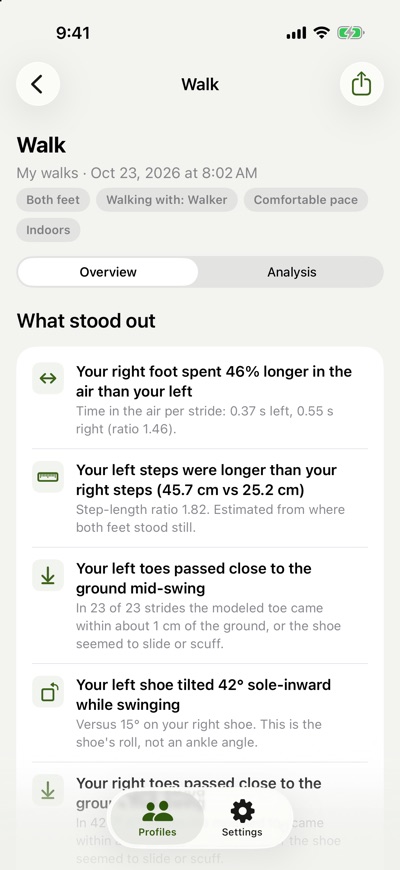
A sensor on each shoe
Tap Record a walk in the app and keep your phone with you; the sensors send their motion to your phone over Bluetooth as you walk.
Walk the way you usually do, indoors or out. When you finish, the results are ready.
What you see after a walk
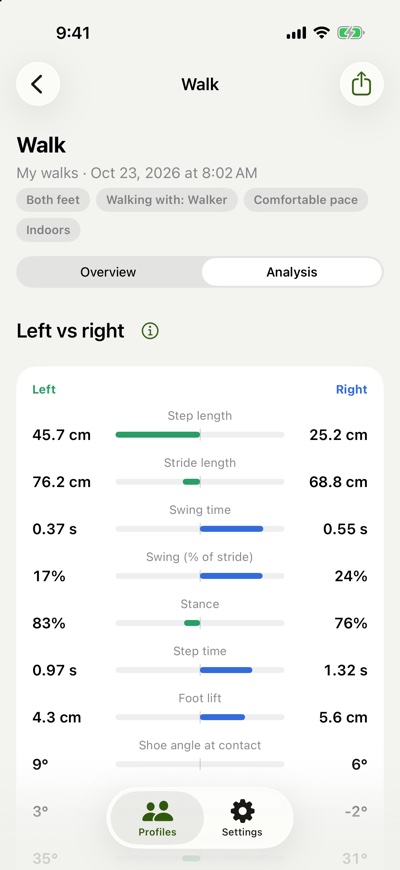
Left against right
The app measures step length, swing, stance and foot lift for each foot. In every row, the bar leans toward the larger side.
A few sentences about each walk
After each walk, the app writes down what stood out. It wrote this about one of the walks on this page.
Your left steps were longer than your right steps (45.7 cm vs 25.2 cm).
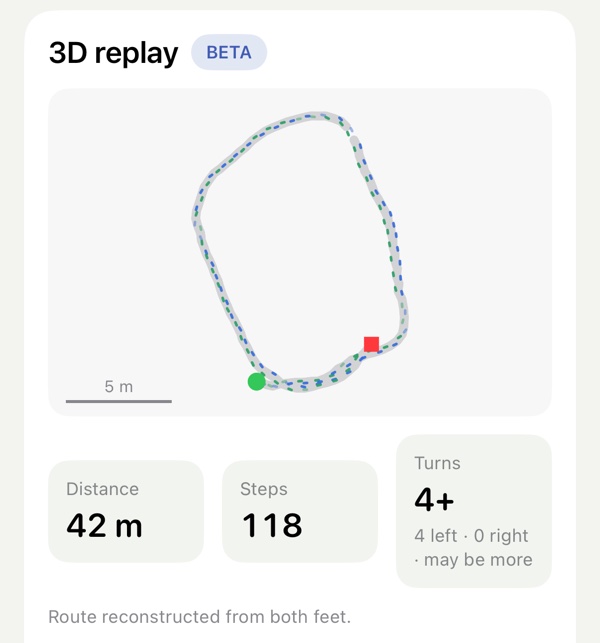
Where you walked
The app draws your route from both feet and works out how far you went. Open the 3D replay (beta) to watch the walk play back.
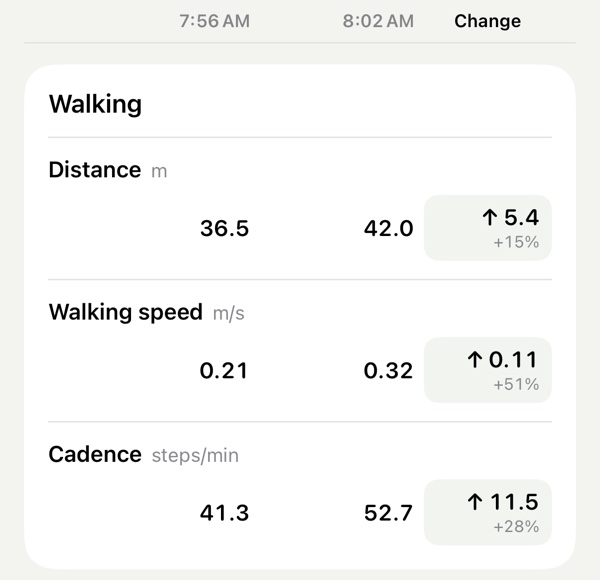
Compare two walks
Pick any two walks to see each number side by side, with the change between them.
Every way of walking counts
Before a walk, you can pick what you're walking with.
- Cane
- Quad cane
- Walker
- Rollator
- Crutches
- Walking poles
- Nothing at all
A walk can be one slow lap of the kitchen or an hour on a trail. The app sets no targets and gives no grades.
A note from the founder
I walk with a walker. I wanted to see what my walks look like, foot by foot and step by step, and to track my progress over time. So I built Gait Capture. The walks on this page are mine.
Your walks stay on your phone
There's no account and no cloud. Walks are kept out of iCloud backups, and nothing leaves your phone unless you share it.
If you allow it, the app also saves your phone's location and motion with each walk.
Questions
Is this a medical device?
No. Gait Capture is for general wellness. It shows how you walk, and it does not diagnose anything.
How accurate are the numbers?
The app calculates every number from how your shoes move, so a different pair of shoes or a different surface can shift them. Walks in the same shoes, on a similar surface, compare best.
What do I need?
An iPhone with iOS 26 or later, and two sensors (one for each shoe). To ask for a pair, email us.
How do I get the app?
Gait Capture is in an invite-only beta. We send invites by email, a few at a time, through TestFlight (Apple's app for trying apps before release).
Can I use a cane, walker or crutches?
Yes. Note it in the app under "Walking with". The sensors are on your shoes, so weight carried by an aid isn't measured.
Who is it for?
Anyone curious about how they walk. Coaches, trainers and running or shoe stores can email us too.
Ask for sensors and an invite
Or write to orders@pushforgold.com. Please don't include health information.